 Jambolaya
What Changed?
How to play
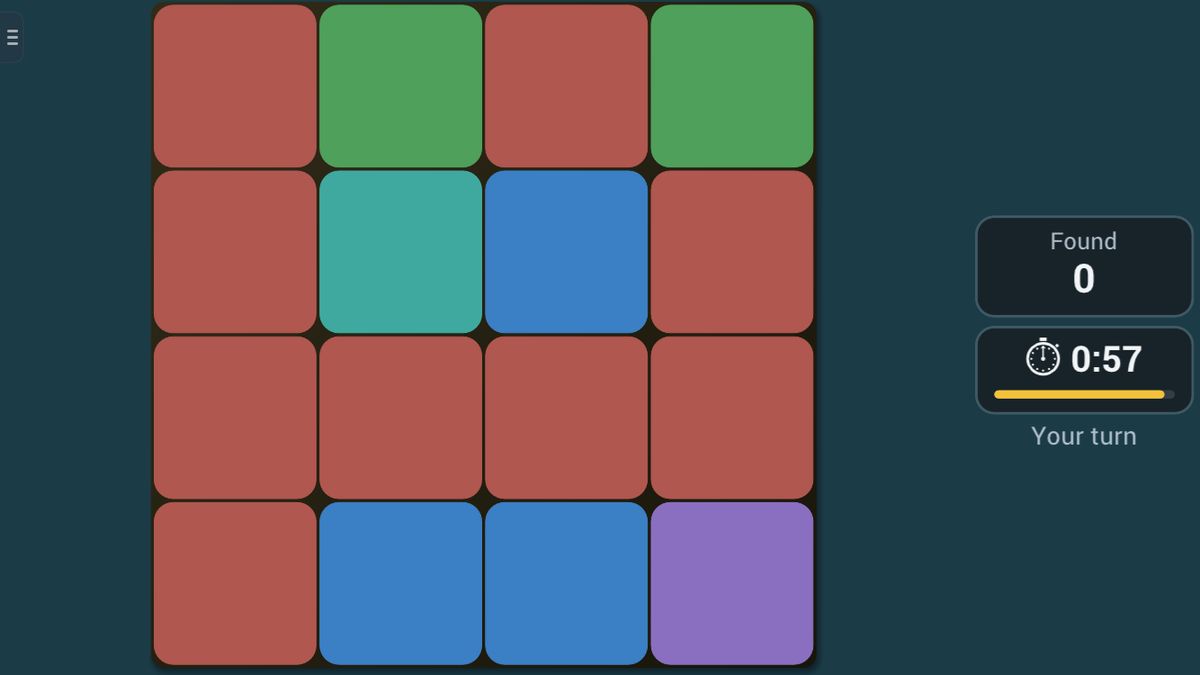
Study the grid of coloured tiles. It blanks for a moment, then reappears with exactly one tile recoloured — tap the one that changed. A correct spot scores and deals a new scene. How many changes can you catch before time runs out?
The aim
What Changed? shows you a grid of coloured tiles for a few seconds. Then it blinks away and comes back with exactly one tile in a new colour. Your job is to tap that tile. Every change you catch scores a point, and you try to catch as many as you can before the clock runs out.
How to play
There are no turns. Before you start, choose a level:
- Easy: a 3×3 grid in four colours, shown for 3 seconds.
- Normal: a 4×4 grid in six colours, shown for about 2 seconds.
- Hard: a 5×5 grid in six colours, shown for just over 1.5 seconds.
Each scene goes like this:
- Watch. The grid appears, and beside it the game shows "Watch…". Taps do nothing yet.
- Blink. All the tiles go dark for a moment.
- Answer. The grid comes back with one tile recoloured, and the game shows "Your turn". There is no hurry within a scene; take a good look, then tap.
- If you are right, that tile gets a green ring and you score a point. If you are wrong, your tile gets a red ring and the real one is ringed green, so you see what you missed. No point is lost.
- Either way, a brand-new scene follows a moment later.
An example on Easy: the top row is blue, gold, blue, and the middle tile is green. After the blink, the middle tile is red. You tap it, see the green ring, and the next scene begins.
Scoring and winning
Your score is the number of changes you found. A wrong tap scores nothing, but it never takes points away.
Alone, you choose a round of 1, 3 or 5 minutes. When time is up, the app shows how many changes you caught.
In a race, the player who invites picks the level, and the round lasts one minute for both of you. You both see exactly the same scenes, but never each other's board, only your rival's score. When the clock runs out, the higher score wins. The same score is a draw.
Tips to play better
- Name the colours. Say them softly in your head: "blue, gold, blue." Words stick better than pictures alone.
- Go row by row. On a bigger grid, read the first row, then the second, as if you were reading lines of a book.
- Look for shapes. Three greens in a corner, or a line of blue across the middle, are easy to remember. A change often breaks a shape like that.
- Remember the odd ones. A colour that appears only once or twice on the grid is easy to keep in mind, and easy to check after the blink.
- Compare before you tap. When the grid comes back, check your remembered rows one by one. There is no timer on a single scene, only on the whole round.
Common mistakes
- Tapping during the watch time. Taps only count once the grid comes back.
- Guessing too fast. A wrong tap scores nothing and moves you on to the next scene, so that scene is lost.
- Trying to remember every tile on Hard. Remember a few rows or shapes well instead of all 25 tiles badly.
Playing with family
What Changed? needs no reading and no numbers, just sharp eyes and a good memory for colours. Easy, with nine tiles and four colours, is a gentle start for young children, while Hard keeps grown-ups on their toes.
The guided lesson shows a scene, rings the changed tile once, and gives the tip to name the colours. Then you catch the next change on your own, from memory alone.
There is no computer opponent. Play alone, or, in the app, race another player together nearby, each on your own phone or tablet, with no Wi-Fi or internet needed. The browser edition is for one device.
Ways to play
- On your ownPlay alone, whenever you like.
- Play together, nearbyOne-on-one with someone in the same room, each on your own phone or tablet. No Wi-Fi or internet needed. In the Jambolaya app.
- Learn by playingA guided lesson on the real game teaches you the rules one step at a time.
 Color Clash1–2 players
 Shopping List1–2 players
 Math Sprint1–2 players
 Number Recall1–2 players
 Number Forge1–2 players
 Anagram Twist1–2 players
 Word Ladder1–2 players
 Word Search1–6 players