 Jambolaya
Blend It
How to play
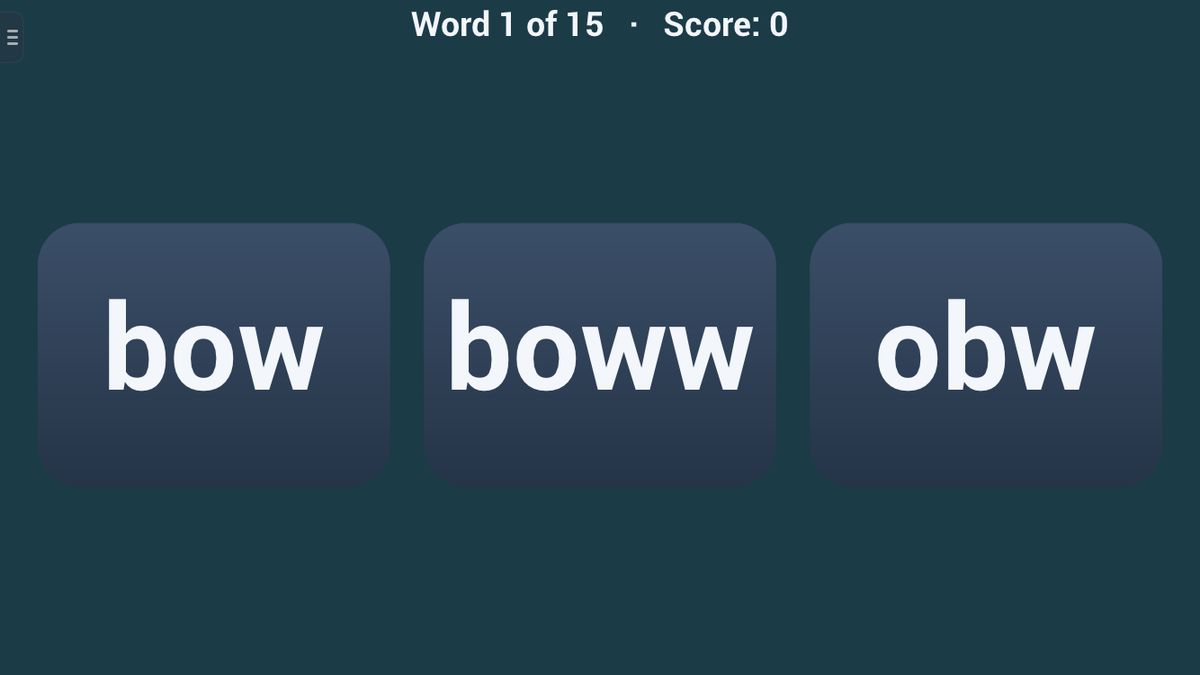
The letters of a word arrive on the line one at a time — each is named when your device has a voice for the language — with a gap that grows as the round goes on. Blend the sounds; when the line hides, tap the word they make among its look-alikes.
Tap the line to hide it early. A wrong tap costs nothing: the right word is ringed and said whole, and the item stays until you tap it — only a first-try answer scores.
Fifteen words: three letters, then four, then five, with three choices at first and four later on.
The aim
The letters of a word arrive one by one, and you join their sounds in your head. Then you pick that word from a few look-alikes. A round is fifteen words; try to get each right on the first try.
How to play
A line of blanks appears, one per letter. The letters land on it one at a time. If your device has a voice for the language, it names each letter as it lands. Without a voice, or with the Voice setting off, you simply see them.
- Shortly after the last letter, the line hides by itself. You can also tap it to hide it sooner.
- Now three or four words appear. Tap the one the letters made.
- Right: a chime plays, the voice (if any) says the word, and the next word starts arriving.
- Wrong: your pick is ringed red, and the right word is ringed green and said. The letters that differ are marked in both. Tap anywhere to go on, then tap the right word.
An example: c, a and t arrive. You think "c… ca… cat". The line hides, and you see cat, cta and cet. You tap cat.
The look-alikes come from small changes: two neighbouring letters swapped, a letter swapped for one that looks like it (b and d), a letter left out, or a letter doubled.
Scoring and winning
Your score counts the words you picked right on the first try, up to 15. A wrong tap takes no points away.
The level sets the words and the pace:
- Easy: common words of 3, then 4 letters; a slow 1.2 seconds between letters; three choices.
- Normal: 3, then 4, then 5 letters. The gap grows from 0.6 to 1.2 seconds, so you hold the sounds longer. Three choices, then four from word 9.
- Hard: 5, then 6 letters; a quick 0.6 seconds; four choices, real words where possible; less common words.
Alone, you play with no timer, or with a 1 or 3 minute clock. When you finish, the app shows how long you took.
In a race, the player who invites picks the level, and you both get the same fifteen words, in the inviter's language. You see your rival's score as you play. The first to finish all fifteen wins; finishing at exactly the same moment is a draw.
Tips to play better
- Blend as they land. Don't wait for the whole word. Add each sound to the last: "s… su… sun".
- Turn names into sounds. The voice says each letter's name. Change it to the letter's sound before you blend.
- Check the order. Many look-alikes have the right letters in the wrong order.
- Count the letters. A look-alike may have a letter missing or doubled. Your word had as many letters as the line had blanks.
- Whisper what you have. On the slower words, saying the part so far helps you hold on to it.
Common mistakes
- Hiding the line too soon. A tap hides it at once, even before the last letters have arrived.
- Mixing up b and d. Check which way the round part faces.
Playing with family
Blend It suits children learning to read, and anyone who wants calm practice with letters and sounds. Under Reading in Settings, you can make the letters larger.
The guided lesson waits for you: the line stays until you tap it away. You blend and pick two words, then learn what a wrong tap does.
There is no computer opponent. Play alone, or, in the app, race another player together nearby, each on your own phone or tablet, with no Wi-Fi or internet needed. The browser edition is for one device.
Ways to play
- On your ownPlay alone, whenever you like.
- Play together, nearbyOne-on-one with someone in the same room, each on your own phone or tablet. No Wi-Fi or internet needed. In the Jambolaya app.
- Learn by playingA guided lesson on the real game teaches you the rules one step at a time.
 Word Builder1–2 players
 Odd One Out1–6 players
 Quick Tap1–2 players
 Perfect Ten1–2 players
 Echo Chain1–2 players
 What Changed?1–2 players
 Color Clash1–2 players
 Shopping List1–2 players