 Jambolaya
Sound Hunt
How to play
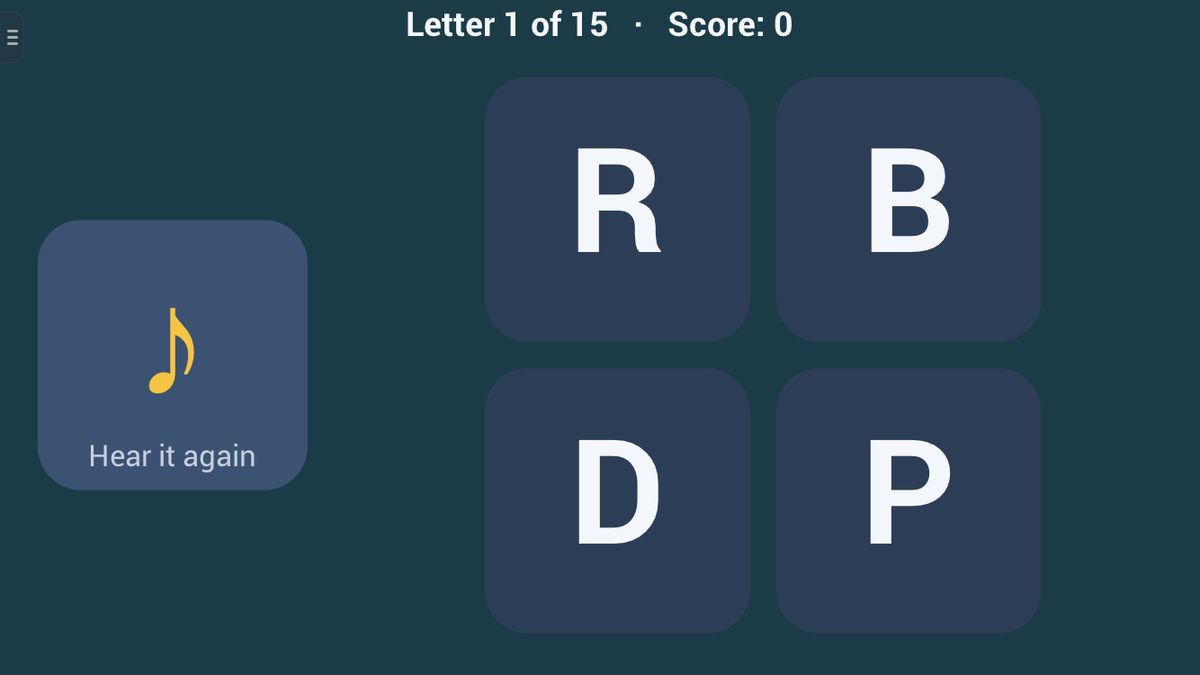
You hear the name of a letter. Tap the letter that has that name. The other choices are letters that look like the right one. Tap the speaker to hear the name again as often as you like.
With the voice switched off, the letter is shown for a moment and then hidden instead. A wrong tap costs nothing: the right letter lights up and is named, and only a first-try answer scores. Fifteen letters, with four choices at first and six later on.
The aim
In Sound Hunt you hear the name of a letter, then find that letter among a few others. The catch is that the others are often look-alikes, such as b, d, p and q. Your aim is to pick the right letter on the first try, fifteen times, and to finish quickly.
How to play
There are no turns. Before you start, you choose three things:
- Difficulty. Easy: 3 choices, then 4 from the eighth letter, and the wrong ones are never look-alikes. Normal: 4 choices, then 6 from the eighth letter, look-alikes first. Hard: 6 choices from the start, look-alikes first.
- Letters. In languages with capital letters, lowercase (abc) or capitals (ABC).
- Timer. No timer, 1 minute or 3 minutes.
The app says a letter's name in the app's language, using your device's own voice. Tap the speaker tile to hear it again, as often as you like. Then tap the letter you heard. It stays on screen for a moment, and the next name is said.
A wrong tap costs nothing. The right letter is ringed and named again, and you tap it to move on.
An example on Normal: you hear "bee". The choices are d, b, q and p. You tap d by mistake. The b is ringed and you hear "bee" again. You tap b, and the next letter comes. That one does not score, because it was not your first try.
Scoring and winning
Your score is the number of letters you got right on the first try, out of fifteen. The top of the screen shows where you are, for example "Letter 6 of 15", and your score.
Alone with no timer, the round ends after the fifteenth letter, and the app tells you how many seconds you took. With a timer, if the clock runs out first, it shows your score.
In a race, both players get the same letters and choices, with the inviter's level, letter case and language. You see your rival's score, but speed decides: the first to finish all fifteen wins. If you finish moments apart, the faster time wins; exactly the same time is a draw.
Tips to play better
- Say it back. Whisper the name after the app, then look. Saying it yourself ties the sound to the shape.
- Use the bed trick for b and d. Make two fists, thumbs up, knuckles touching. Your left hand makes a b, your right a d, and together they look like a bed.
- Check which way it faces. Look-alikes are often one shape flipped. Is the round part left or right? Does the stick go up or down?
- Hear it again when unsure. The speaker costs nothing; a guess can cost the point.
Common mistakes
- Listening for a letter's sound instead of its name. The app says "bee", not the "b" sound at the start of "bat".
- Tapping the first letter that looks about right. On Normal and Hard, the wrong choices are picked to look alike.
Playing with family
Sound Hunt suits children learning their letters, and anyone who mixes up b and d. Easy, with no look-alikes and no timer, is a gentle start; Hard keeps grown-ups honest.
The game needs a voice: without an offline voice for the app's language on your device, Sound Hunt stays hidden until one is installed. With the Voice setting off, the letter is shown for a moment, then hidden.
The guided lesson lets you tap the speaker and find three letters, the first one ringed for you, and explains what a wrong tap does.
There is no computer opponent. Play alone, or, in the app, race another player together nearby, each on your own phone or tablet, with no Wi-Fi or internet needed. Both devices need a voice for the race's language. The browser edition is for one device.
Ways to play
- On your ownPlay alone, whenever you like.
- Play together, nearbyOne-on-one with someone in the same room, each on your own phone or tablet. No Wi-Fi or internet needed. In the Jambolaya app.
- Learn by playingA guided lesson on the real game teaches you the rules one step at a time.
 Sound Chain1–2 players
 Look, Cover, Build1–2 players
 Missing Letter1–2 players
 Rhyme Time1–2 players
 Syllable Tap1–2 players
 Twin Words1–2 players
 Word Flash1–2 players
 First Sound1–2 players