 Jambolaya
First Sound
How to play
A word is spoken when your device has a voice for the language — without one, it shows for a second and then hides. Tap the letter it starts with. The wrong choices are letters that look like the right one. Tap the tile to hear or see the word again.
A wrong tap costs nothing: the right letter is ringed and the word is said or shown again, and the item stays until you tap it — only a first-try answer scores.
Fifteen words: three letters, then four, then five, with three choices at first and four later on; the last five ask for the letter the word ends with.
The aim
You hear a word and find the letter it starts with; later words ask for the letter it ends with. A round is fifteen words; try to get each right on the first try.
How to play
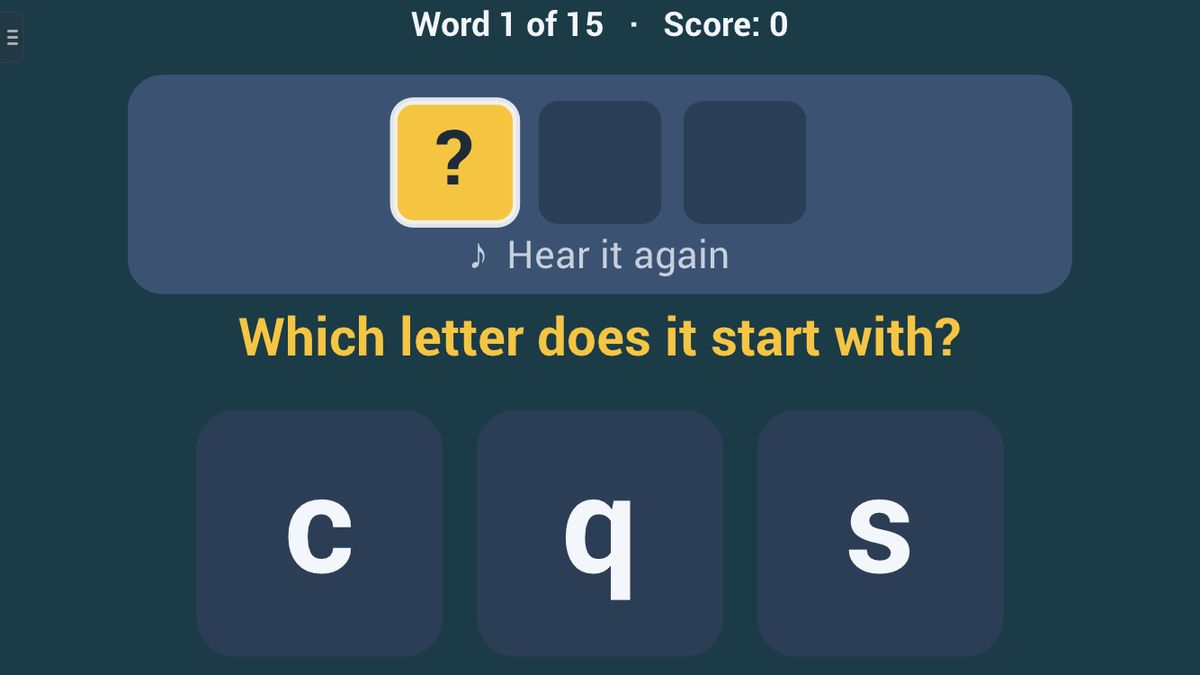
Your phone or tablet says each word with its own voice, in the language you play in. The word stays hidden: you see a row of boxes, one per letter, with a ? in the box you are asked about. A big line asks "Which letter does it start with?"
- Listen. Tap the word tile to hear it again, as often as you like.
- Tap the letter it starts with. There are three or four letters to choose from.
- Right: the word appears, your letter is marked green, and the next word follows.
- Wrong: your pick is ringed red, the right letter is ringed green, and the word is said again. Tap anywhere to go on, then tap the right letter.
An example: you hear "dog". The choices are b, d and q. You tap d, and the word "dog" appears.
Words grow as you go: three letters for words 1 to 5, four for 6 to 10, five for 11 to 15. When the question changes to "Which letter does it end with?", the ? moves to the last box.
If the Voice setting is turned off, each word shows for one second and then hides, and you answer from memory.
Scoring and winning
Your score counts the words you got right on the first try, up to 15. A wrong tap takes no points away.
The level decides what is asked:
- Easy: always the first letter, three choices, no look-alike letters, and the most common words.
- Normal: the first letter for words 1 to 10, then the last letter; three choices, and four from word 9.
- Hard: the last letter from word 6 on, four choices with look-alike letters, and less common words.
Alone, you play with no timer, or with a 1 or 3 minute clock. When you finish, the app shows how long you took.
In a race, the player who invites picks the level, and you both get the same fifteen words, in the inviter's language. You see your rival's score as you play. The first to finish all fifteen words wins; finishing at exactly the same moment is a draw. If the other device has no voice for that language, the race is called off before it starts.
Tips to play better
- Say the word slowly yourself. Stretch it out, "d-o-g", and listen to the very first sound.
- Watch the ? box. It shows whether to listen to the start or the end of the word.
- Know your look-alikes. b, d, p and q are flipped copies of each other. Check which way the round part faces, and which way the stick points.
- In a race, careful beats quick. A wrong tap stops you while the correction shows, so a sure answer is faster in the end.
Common mistakes
- Missing the switch to the last letter. Beginners keep answering the first letter.
- Choosing by shape alone. The wrong letters are chosen to look like the right one.
Playing with family
First Sound suits children learning their letters, and the grown-ups helping them. Easy keeps to common words and letters that do not look alike. Under Reading in Settings, you can make the letters larger.
The guided lesson lets you hear the word again, tap three first letters, see what a wrong tap does, and then play one last-letter word.
There is no computer opponent. Play alone, or, in the app, race another player together nearby, each on your own phone or tablet, with no Wi-Fi or internet needed. The browser edition is for one device.
Ways to play
- On your ownPlay alone, whenever you like.
- Play together, nearbyOne-on-one with someone in the same room, each on your own phone or tablet. No Wi-Fi or internet needed. In the Jambolaya app.
- Learn by playingA guided lesson on the real game teaches you the rules one step at a time.
 Word Spotter1–2 players
 Blend It1–2 players
 Word Builder1–2 players
 Odd One Out1–6 players
 Quick Tap1–2 players
 Perfect Ten1–2 players
 Echo Chain1–2 players
 What Changed?1–2 players