 Jambolaya
Star Strikers
How to play
Soccer meets pool. Each turn, drag back one of your five star discs and release to flick it — it caroms into the ball and the other discs like a pool break. Knock the ball through the opponent's goal mouth to score; the conceding side kicks off.
First to three goals wins.
The aim
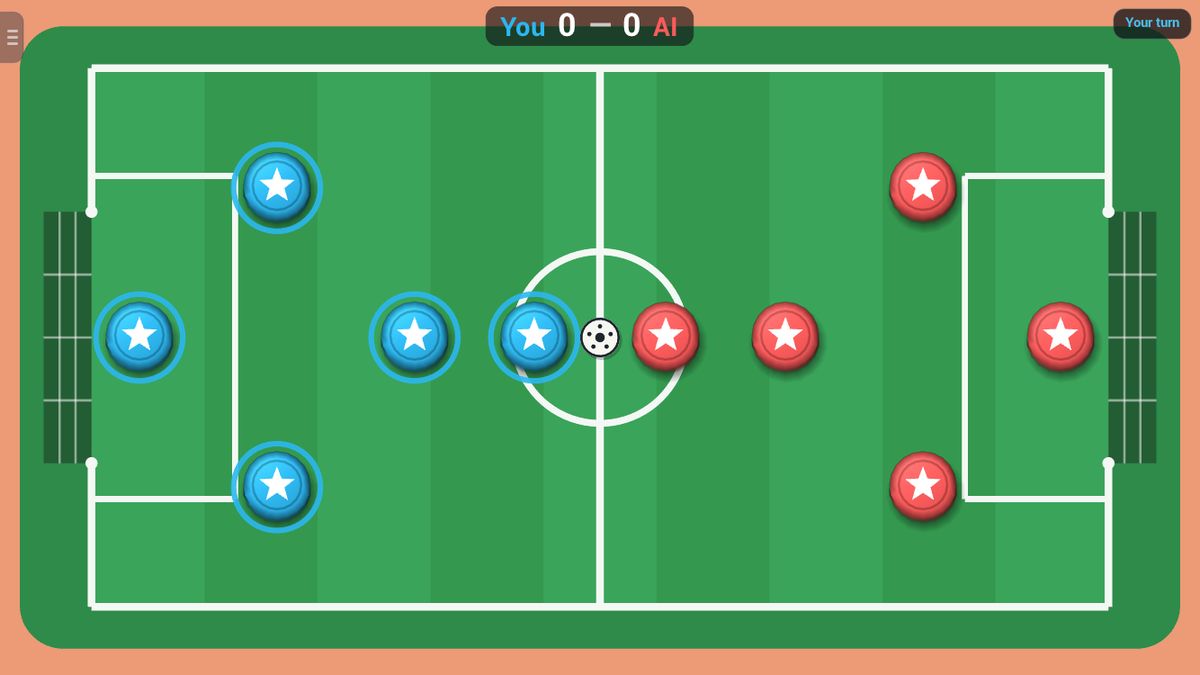
Star Strikers is football played like pool. Each side has five round discs with a star on top: a keeper in front of the goal, two defenders, a midfielder and a forward. The ball starts on the centre spot. Flick your discs into the ball to knock it into the other side's goal. The first side to score three goals wins.
How a turn works
On your turn you flick one disc, just one.
- Put your finger on one of your own discs. You have to start on it or right next to it.
- Pull back, like a slingshot. An arrow shows where the disc will go, which is the opposite way to your pull.
- The longer you pull, the harder the flick.
- Let go. If you barely moved your finger, nothing happens, so you can change your mind.
The disc shoots off and bumps into the ball and any other discs in its way, which bounce on in turn, like balls on a pool table. When everything stops, the other side plays. You never get two flicks in a row, even after a goal.
A small example. The ball sits a short way in front of your forward, in line with the other goal. You put your finger on the forward, pull straight back, away from that goal, and let go. The forward runs into the ball and sends it on towards the goal, unless an opponent's disc is in the way.
Discs bounce off the goal mouth as if it were a wall. Only the ball can go in.
Scoring and the end of the game
A goal counts the moment the ball crosses the goal line between the posts. If you knock the ball into your own goal, the other side scores.
After a goal, every disc and the ball glide back to their starting spots, and the side that let the goal in kicks off.
There is no clock and no limit on turns. The game goes on until one side has three goals, so it can never end in a draw. Against the computer you can also play a best of 3 or 5 games.
Tips to play better
- Hit the ball from behind. Picture a line from the goal through the ball. Flick a disc along that line from behind the ball, and the ball goes straight at goal.
- Aim for a corner. The keeper usually stands in the middle of the goal. A ball sent to the side away from the keeper is much harder to stop.
- Keep your keeper at home. The goal mouth is almost half as wide as the pitch. A disc sitting in front of it blocks a lot of shots.
- Use medium power. A full-power flick scatters discs everywhere, your own defenders too. A firm, controlled hit is often better.
- Think about where the ball stops. After your flick it is their turn. Try not to leave the ball sitting in front of their forward.
Common mistakes
- Pulling the keeper out to attack and leaving the goal wide open.
- Clearing the ball across your own goal, where one bounce can turn it into an own goal.
- Using a disc that sits between the ball and the other goal. It will usually knock the ball back towards your own half.
- Starting the drag too far from a disc, so nothing is picked up.
Playing with family
Star Strikers is quick to learn: touch, pull and let go. Young children love the crashes and bounces, older players plan angles and defend like a real team, and with no clock nobody is rushed.
In Jambolaya you can play against the computer. Choose Easy, Normal or Hard, choose who kicks off, and play one game or a best of 3 or 5. The computer never flicks its own keeper.
In the app you can also play together nearby, each on your own phone or tablet, with no Wi-Fi or internet needed. The browser edition plays on one device.
Ways to play
- Against the computerPlay on one device against a computer opponent.
- Play together, nearbyOne-on-one with someone in the same room, each on your own phone or tablet. No Wi-Fi or internet needed. In the Jambolaya app.
 Air Hockey1–2 players
 Carrom1–2 players
 Crokinole1–2 players
 Prism Rush1–4 players
 Fruit Rush1–2 players
 Pool (8-Ball)1–2 players
 Archery1–2 players
 Darts 3D1–2 players