 Jambolaya
Jigsaw
How to play
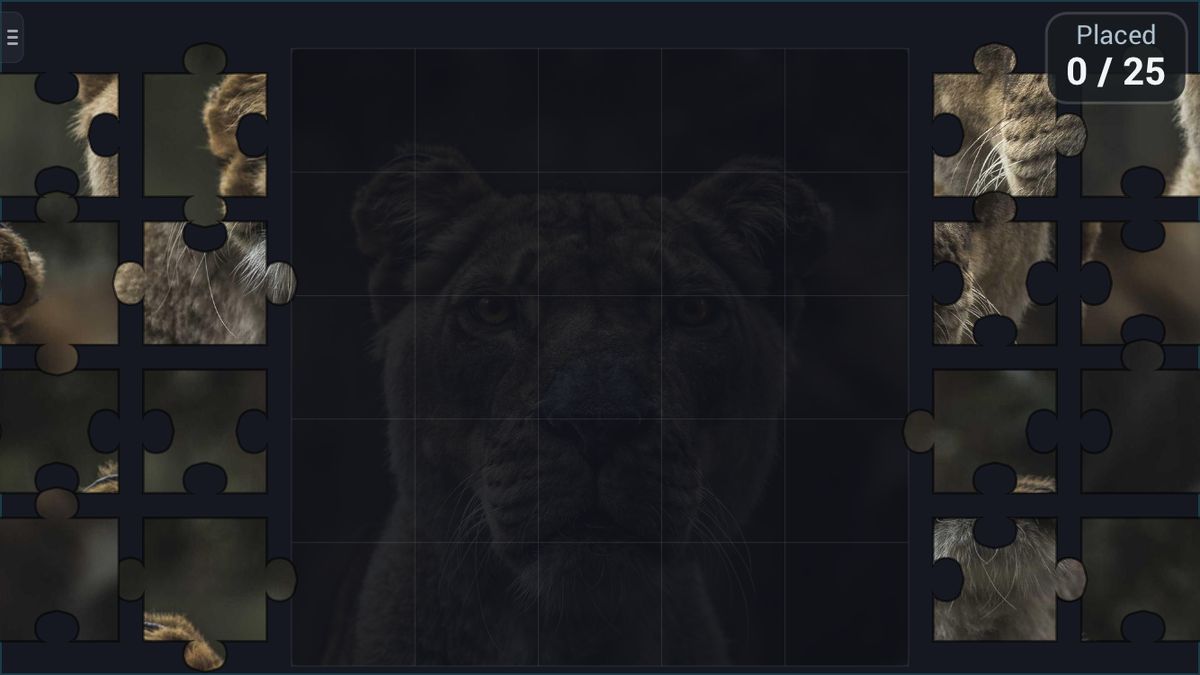
Rebuild the photo from real jigsaw pieces. Drag a piece to move it; drop it near its spot and it snaps home. Pinch (or mouse-wheel) to zoom, and drag empty space to move the board around.
Pick a picture and a difficulty (3×3 / 5×5 / 7×7 pieces) before you start. Place every piece to finish.
The aim
Jigsaw is a picture puzzle made of real interlocking pieces, with tabs and holes like a cardboard puzzle. A photo has been cut up, and you put it back together on the board. Play alone and take as long as you like, or race another player to finish the same picture first.
How to play
There are no turns. The board sits in the middle, with a faint copy of the finished photo on it as a guide. The loose pieces are stacked in trays on both sides.
- Drag a piece onto the board.
- Let it snap. Drop a piece close to its own spot and it clicks in for good; a placed piece cannot be moved again. Dropped anywhere else, it stays where you left it.
- Move around. Drag an empty part of the screen to move the view. Pinch, or use the mouse wheel on a computer, to zoom.
Pieces lock onto the board, not onto each other, and they never need turning.
Alone, you choose a difficulty before you start: Easy has 9 pieces, Normal 25 and Hard 49. Then pick a photo, Lion, Jellyfish, Blossom, Canyon, Fjord, Waterfall or Cottage, or choose Surprise me.
A small example: a piece has straight edges along its top and left side, and blue sky across it. Two straight edges mean a corner; sky and top-left mean the top-left corner. Drag it there and it snaps in.
How a solo game ends and how a race is won
Alone, there is no clock to beat. The game ends when every piece is in place, and the app tells you how many seconds you took. Try to beat your own time, or move up a difficulty.
In a race, both players build the same photo, picked by the app, with 25 pieces. You see how many pieces your rival has placed, never their board. The first to place every piece wins. If you finish within a moment of each other, the faster time wins; exactly the same time is a draw.
Tips to play better
- Corners first, then edges. Corners have two straight sides and edge pieces one. Once the frame is done, the middle pieces have far fewer places to go.
- Use the faint picture. Compare a piece's colours with the ghost photo. A strip of red flower or dark rock usually has only one home.
- Sort by colour. Sky, water, grass and shadow each make a group. Work on one group at a time.
- Zoom out to find, zoom in to place. Zoom out to see every piece in the trays, then zoom in to drop a tricky one.
- Read the shapes. If a spot needs a tab on the left and a hole at the bottom, only a piece with that shape fits.
Common mistakes
- Thinking a piece is wrong because it did not snap. Bring it a little closer to its exact spot first.
- Trying to join two loose pieces off the board. Here, pieces only fit into the board.
- Missing pieces on bigger puzzles because the trays run off the screen. Zoom out or drag the view.
Playing with family
Jigsaw needs no reading at all, which makes it one of the best games for young children. A small child can do Easy, with its 9 big pieces, with a little help, while Hard is a calm, satisfying puzzle for a grandparent. A child and a grandparent can also share one tablet and take turns placing pieces.
The guided lesson shows the faint picture, lets you drag two pieces into place with your own fingers, and explains moving and zooming.
There is no computer opponent. Play alone, or, in the app, race together nearby, each on your own phone or tablet, with no Wi-Fi or internet needed. The browser edition is for one device.
Ways to play
- On your ownPlay alone, whenever you like.
- Play together, nearbyOne-on-one with someone in the same room, each on your own phone or tablet. No Wi-Fi or internet needed. In the Jambolaya app.
- Learn by playingA guided lesson on the real game teaches you the rules one step at a time.
 Tile Slide1–2 players
 Flood1–2 players
 Blackout1–2 players
 Guess the Word1–2 players
 Sudoku Duel1–2 players
 Nonogram1–2 players
 Word Duel1–2 players
 Letter Storm1–2 players